Traba
- 4.2
- Rating
- 100.00K
- Installs
- Free
- Price

 Analysis by App-foxy
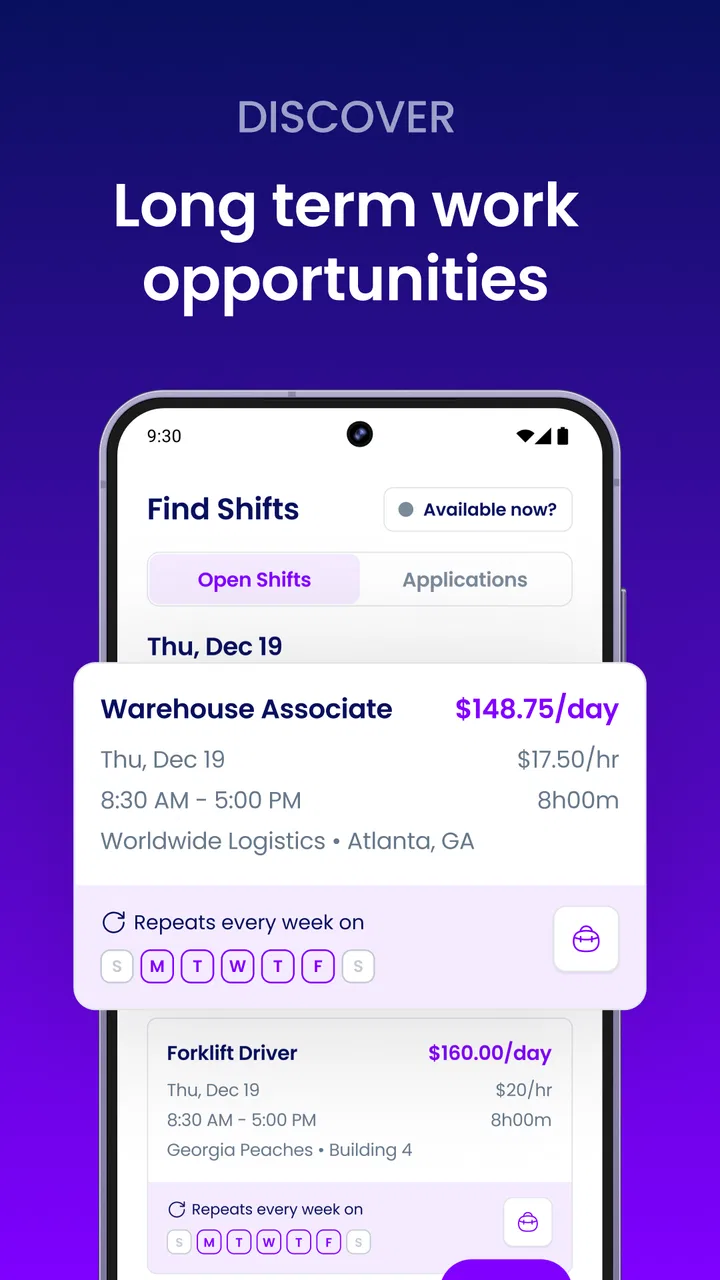
I approached Traba as a practical work-search tool rather than another app I would open casually. It is a free business app from Traba, aimed at people looking for flexible work opportunities through a phone. That focus matters: the useful question is not whether it has a polished collection of extras, but whether it helps you move from “I need work” to a realistic next step without creating unnecessary confusion.
My overall impression is cautiously positive. The app has a clear purpose, a simple reason to install it, and enough traction to suggest that it is not an obscure experiment. It holds a 4.1 average from around 4.5 thousand ratings, with more than 100 thousand installs. Those figures do not guarantee that every shift or opportunity will suit every person, but they do make Traba worth examining if flexible employment is your priority.
What Traba is really useful for
The strongest use case is someone who wants to discover work with more flexibility than a conventional full-time search allows. That could include a person between jobs, someone trying to fit employment around family responsibilities, or a worker who prefers to review available opportunities before committing to a longer arrangement. I would not treat it as a complete replacement for every job-search method, but it can serve as a focused starting point.
You May Also Like

 Blood Strike: 2.5 Anniversary
Blood Strike’s Loadouts Turn Every Drop Into a Tactical Gamble
A close look at Blood Strike’s custom loadouts: how fast access to signature weapons reshapes its battle royale rhythm, rewards preparation, and narrows the gap between fights.

 Pandora - Music & Podcasts
Pandora’s Music Is Easy to Start, but Harder to Recover
Pandora’s strength is its low-effort path from a seed to a station. Its weak spot is how much confidence it asks you to place in connection, setup, and quiet recovery.

 8 Ball Pool
 Is Built on Rivalries, Rematches, and Routine
A close look at the rivalries, rematches, shared routines, and unanswered safety questions that turn a quick pool match into a persistent mobile community.

 Samsung Music
’s Quiet Strength Is Playing What You Already Own
Its reach comes less from spectacle than from dependable access to a personal library. That simplicity is both the app’s strongest retention engine and its ceiling.

 AccuWeather: Weather Radar
AccuWeather Review: A Quick, Clear Forecast for Everyday Decisions
For everyday plans, the best forecast is the one you can understand quickly. AccuWeather makes rain timing, radar, and local conditions easy to act on, with a few trade-offs.

 Hill Climb Racing
Why Hill Climb Racing Still Turns Crashes Into One More Run
A tiny car, a bumpy hill and one more upgrade: Hill Climb Racing keeps resurfacing because its simple chaos makes every near-miss feel personal.
More From Our News Desk



The app’s business category is a better description than a broad “career” label would be. It is built around the practical side of finding work, not around professional networking, résumé publishing, industry discussion, or long-form career planning. If your goal is to maintain a polished professional profile, contact recruiters, and compare corporate roles, a traditional employment website may still be more suitable. Traba makes more sense when immediate flexibility is more important than building a formal career portfolio.
That distinction also helps set expectations. I would not install it expecting a personal career coach, a training platform, or a general-purpose professional community. Its value depends on whether the opportunities available through its system match your location, schedule, experience, and willingness to follow the required application steps. The app can make searching more convenient, but it cannot remove those real-world constraints.
Starting without making the process harder
When I test an app like this, I pay attention to the first few minutes. A work app should make it reasonably clear what information is needed and why. Before spending time completing an account, I would have my basic work preferences ready: the kind of schedule I can accept, the area where I can realistically travel, and the type of work I am prepared to do. This avoids entering information casually and then discovering that the available options do not fit my life.
That preparation is one of the less obvious ways to use Traba effectively. Flexible work sounds broad, but flexibility has limits. A person who can work only certain days should not treat every listing as equally relevant. I would review practical details carefully before applying, especially location, timing, expected duties, and any requirements shown in the opportunity. A quick application is not automatically a good application if it leads to an unsuitable commitment.
I also recommend treating the first session as an orientation rather than a race. Explore how the app presents opportunities, note which details are visible before you take action, and check whether the account information can be reviewed or changed. This is not wasted time. In a work-related app, understanding the flow can prevent mistakes later, particularly when you are applying from a small screen or while away from home.
A realistic everyday scenario
Imagine that I have a week with an unexpected gap in my schedule. I need extra income, but I cannot promise a permanent change to my routine. I would open Traba, review opportunities that appear compatible with my availability, and compare the practical effort involved rather than choosing the first appealing option. If one opportunity requires a commute that is too long or a schedule that conflicts with another responsibility, I would discard it early instead of forcing it to work.
The app is most helpful in that moment because it puts the search into a more focused environment than browsing unrelated job pages. I can use it as a shortlist-making tool: identify realistic possibilities, inspect the details, and decide which ones deserve an application. The important trade-off is that convenience can encourage rushed decisions. I would still verify every visible condition and keep my own record of what I applied for, particularly if I am considering several opportunities at once.
That personal record is a simple but valuable workflow. Write down the opportunity, the date you applied, the schedule, and any follow-up action. A work app may organize parts of the process, but your own notes give you a second layer of control. They also make it easier to spot whether an opportunity repeatedly fails to match your needs.
Trust, controls, and the moments that deserve attention
I use the trust section to focus on the choices that matter most when a work search involves personal information and real commitments: keeping account details current, checking requests in context, and pausing before sharing anything sensitive. I also think it helps to separate careful use from unnecessary alarm. Once those habits are clear, the next question is how confidently the app handles everyday use and changing circumstances.
Why trust matters more in a work app
A flexible-work platform naturally involves more sensitive moments than a casual entertainment app. You may create an account, share information relevant to employment, and make decisions that affect your time and income. That does not mean the app should automatically be viewed with suspicion, but it does mean I would use a more deliberate standard before entering personal details or accepting an opportunity.
Traba is rated for Everyone, and it is available as a free app. Those points make the initial barrier low, but they should not be confused with a promise that every work situation will be suitable for every adult. The age label describes the app’s content classification; it does not replace your own judgment about employment requirements, travel, schedule, or the information requested during the process.
I would also distinguish between information needed to operate an account and information I might prefer not to share until it is genuinely necessary. If a screen asks for personal details, I would read the surrounding explanation, check whether the field is required, and avoid supplying extra information simply because it is convenient to do so. That habit is useful on any employment service, including this one.
Checking visible account choices
One of my practical tests for Traba is whether I can remain aware of my own account activity. I would look for clear ways to review profile information, update preferences, manage notifications, and sign out. These controls matter because work availability changes. A schedule that is accurate this week may be wrong next week, and an old preference can lead to irrelevant opportunities or unwanted messages.
I would make a point of revisiting those choices after a change in circumstances. If I become unavailable, move farther away, or no longer want a certain type of opportunity, I should not leave the account untouched and hope the system understands. The best protection is active control over the information and preferences I choose to keep current.
Notifications deserve particular attention. They can be useful when timing matters, but they can also become distracting if every update arrives at an inconvenient moment. I would keep alerts enabled only when they provide a clear advantage, then adjust them if they start interrupting work, sleep, or family time. A flexible-work app should fit around your routine rather than quietly taking over your attention.
Data-sensitive moments during use
The most sensitive point is usually not installation; it is the moment when an app asks for information connected to identity, eligibility, contact, or employment. I would slow down there. Read the wording on the screen, check where the information is being entered, and avoid completing a form while distracted. If a request seems unrelated to the opportunity I am pursuing, I would pause and seek clarification through the app’s available support route before continuing.
I would use the same care with documents, messages, and account recovery. Keep login details private, avoid sharing verification information with another person, and do not assume that a message is trustworthy merely because it appears alongside a work opportunity. If something feels inconsistent, I would stop rather than trying to solve the problem by sending more personal information.
These are not accusations about Traba or claims about a particular data practice. They are sensible boundaries for using any service connected to employment. The app’s role is to help organize access to flexible work; my role is to decide what I am comfortable sharing and to review each request in context.
Where the app may fall short
The biggest limitation is that a focused work app cannot guarantee a perfect match. Availability, location, schedule, and the nature of the work all determine whether it will be useful. Someone living in an area with few relevant opportunities may open the app often and still find that it does not solve the immediate problem. That is not necessarily a technical failure, but it is a real limitation for the user.
There is also a risk of confusing speed with certainty. A streamlined application flow can feel encouraging, yet the final decision still depends on circumstances outside the app. I would not stop using other sensible job-search channels until I had a dependable work arrangement. Traba is better viewed as one route in a broader plan than as a guarantee of income.
Another trade-off concerns the kind of work you want. If you need a predictable long-term position, benefits, a detailed company culture review, or a structured professional ladder, a conventional employer site may provide a better context for comparison. Traba’s flexible-work focus is an advantage for short-term or adaptable needs, but that same focus may feel limited to someone searching for a conventional career move.
Who should use it, and who should skip it
I would recommend trying Traba if you value flexibility, prefer handling a work search from your phone, and are willing to assess each opportunity carefully. It is especially relevant to people who need to explore work around changing schedules rather than committing immediately to a single traditional path. The free price also makes it easy to test without paying an upfront subscription fee.
I would be more hesitant if you dislike app-based applications, need extensive employer background information before making a decision, or require a highly predictable job search with clearly defined long-term progression. In those cases, a larger employment site, a local staffing service, or direct contact with employers may be a better complement or alternative.
I would also skip it as a sole strategy if missing a shift or misunderstanding a requirement would create serious financial or personal problems. Use the app to discover possibilities, but confirm the details you need before relying on an opportunity. Flexibility is valuable only when the arrangement is genuinely workable for you.
Version, maturity, and the practical verdict
Traba has been available since July 12, 2021, and its current version is 1.90.4. It supports Android 7.0 and later, which gives it a broad compatibility range for people using older Android phones. The developer is Traba, and the app has accumulated more than 800 written reviews alongside its wider rating activity. That history suggests an established product rather than a newly released listing, although an established app can still require patience when your local opportunities or personal circumstances do not align with its purpose.
My final view is that Traba is worth trying for a specific reason: you want a flexible-work search tool and you are prepared to stay involved in the decisions it presents. I like the focused purpose, the free entry point, and the possibility of making a phone-based search more manageable. I would not treat it as a substitute for judgment, direct employer communication, or a broader employment plan.
The most responsible way to use it is to keep your profile and preferences current, inspect each opportunity before applying, limit personal information to what is appropriate, and maintain your own notes. If the available work fits your schedule and location, the app can become a useful part of your routine. If it does not, there is no reason to force it. Traba is strongest as a controlled, practical channel for exploring flexible work—not as a promise that every search will end in the right job.
FAQs for Traba
01What is Traba and how does it work?
Traba is a mobile application designed to connect freelancers with clients seeking skilled professionals for short-term projects. The app features a user-friendly interface where freelancers can create profiles, showcase their skills, and apply for jobs. Clients can post projects, review applications, and manage contracts seamlessly through the platform.
02Is Traba free to use?
Traba is free to download and use for both freelancers and clients. However, the app may charge a service fee or commission on transactions completed through the platform. It's important to review the app's terms and conditions for a clear understanding of any potential costs before engaging in projects.
03How secure is my personal information on Traba?
Traba prioritizes user security by implementing robust encryption protocols to protect personal data. The app requires authentication for access, and users can customize privacy settings. It's advisable to review the app's privacy policy to understand how your data is collected, used, and stored.
04What types of projects are available on Traba?
Traba hosts a wide range of projects across various industries, including graphic design, writing, web development, marketing, and more. The platform caters to diverse skill sets, allowing freelancers to find opportunities that match their expertise and interests. Project listings are regularly updated, providing fresh opportunities.
05How do I get started with Traba?
To get started with Traba, download the app from the Google Play Store or Apple App Store. Create an account using your email or social media credentials, then set up your profile by adding your skills, portfolio, and professional experience. Once your profile is complete, you can start browsing and applying for projects.
Pros
- User-friendly interface for easy navigation.
- Efficient job matching based on skills.
- Real-time notifications for job updates.
- Secure payment processing system.
- Responsive customer support team.
Cons
- Limited job categories available.
- Requires stable internet connection.
- Occasional app crashes reported.
- Profile setup can be time-consuming.
- Notifications can be overwhelming.

Traba
Gallery